
这里用的工具是vagrant 1.8.7,VirtualBox 5.0.40, CentOS 7.4 (Minimal)
- 安装CentOS,安装比较简单,但是需要注意几个地方
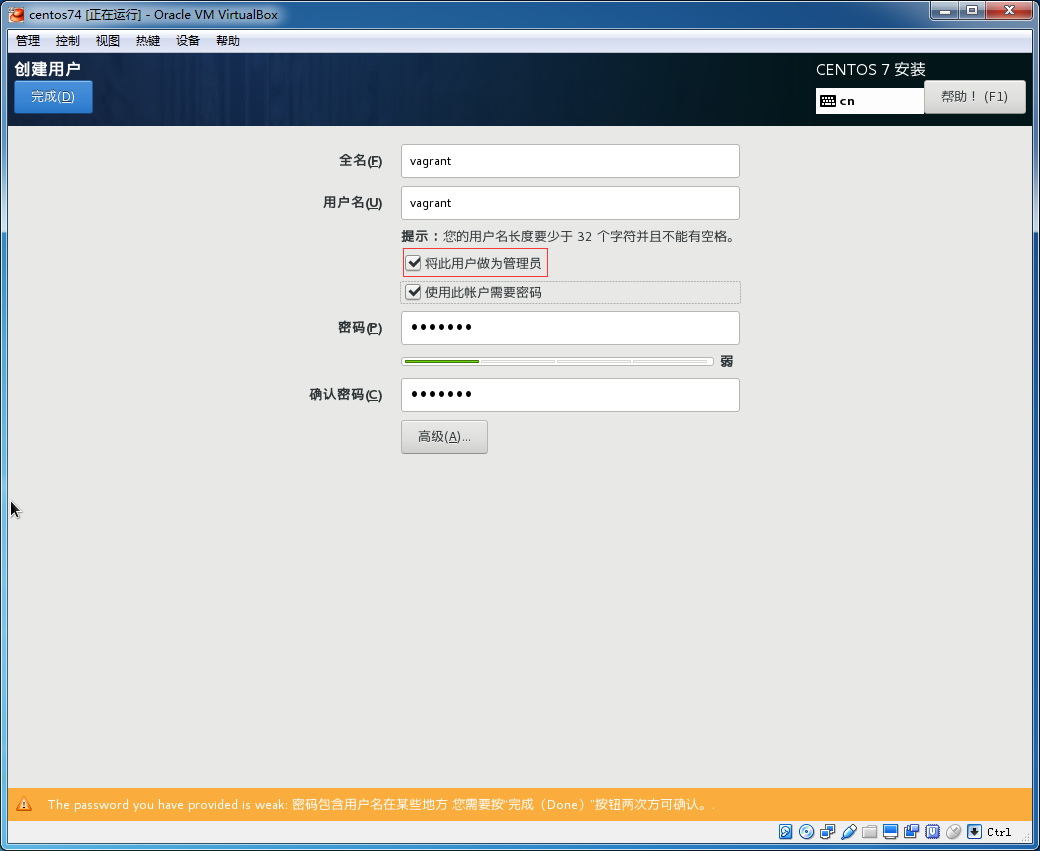
1.root的密码需要设置为vagrant
2.创建用户vagrant时将vagrant设置成为管理员,这样就可以将vagrant加入到wheel组中了,vagrant的密码也是vagrant
- 设置开机启动网络
vi /etc/sysconfig/network-scripts/ifcfg-e[Tab]
将ONBOOT=no改为ONBOOT=yes
- 关防火墙firewall
systemctl stop firewalld.service #停止firewall
firewall-cmd --state #查看默认防火墙状态(关闭后显示not running,开启后显示running)
systemctl disable firewalld.service #禁止firewall开机启动
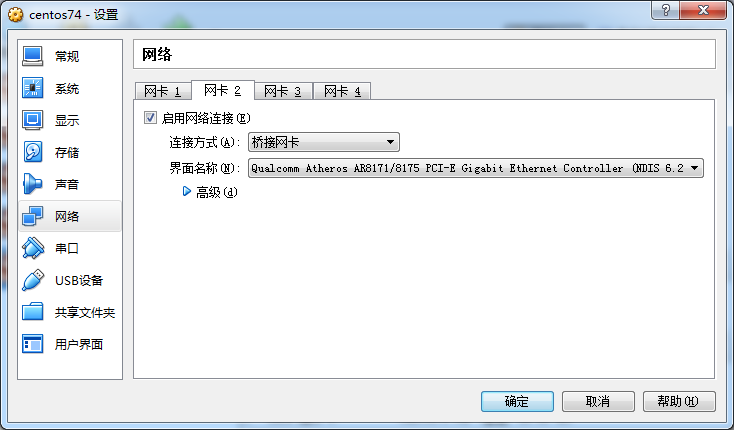
- 关闭虚拟机,为centos再添加一块儿使用桥接方式的网卡,这是因为virtualbox的NAT方式下,win7不能通过ssh连接到虚拟机的centos。
- 解决ifconfig无效的问题,安装net-tools
yum -y install net-tools
安装完后可以用ifconfig查看桥接网卡的ip地址,选一个自己喜欢的ssh客户端软件(如putty)连接到虚拟机。
- 安装Virtualbox增强功能,并开启sshd
yum -y install wget openssh-server  kernel-devel-`uname -r` gcc binutils make perl bzip2 elfutils-libelf-devel gcc-c++ kernel-devel kernel-headers make perl tar
wget http://download.virtualbox.org/virtualbox/5.0.40/VirtualBox-5.0.40-115130-Linux_amd64.run
sh VirtualBox-5.0.40-115130-Linux_amd64.run && rm -f VirtualBox-5.0.40-115130-Linux_amd64.run
service sshd start
chkconfig sshd on
- 下载public key
cd /home/vagrant
mkdir /home/vagrant/.ssh
wget https://raw.githubusercontent.com/hashicorp/vagrant/master/keys/vagrant.pub -O .ssh/authorized_keys
chmod 0700 .ssh
chmod 0600 .ssh/authorized_keys
chown -R vagrant:vagrant .ssh
- 为vagrant用户设置sudo免密码操作
因为已经将vagrant用户设置成了管理员,所以vagrant已经加入到了wheel组中了,所以可以设置wheel组免密码。
方法是将/etc/sudoers中的"# %wheel ALL=(ALL) NOPASSWD: ALL"前面的"#"去掉。
sed -i "s/# %wheel/%wheel/" /etc/sudoers
如果vagrant不是管理员,那么只需要设置vagrant用户免密码即可。即可以在root ALL=(ALL) ALL下面加一行:
vagrant ALL=(ALL) NOPASSWD: ALL
- 关闭虚拟机,在win7的cmd下做端口映射
D:\\Program Files\\Oracle\\VirtualBox>VBoxManage modifyvm "centos74" --natpf1 "host2guest-ssh,tcp,,2222,,22"
说明:centos74是虚拟机的名字
- 打包
vagrant package --base centos74 --output=centos74.box
如果报错:No guest additions were detected on the base box for this VM! Guest additions are required for forwarded ports, shared folders, host only networking
vagrant plugin install vagrant-vbguest --plugin-version 0.21
- 添加box
vagrant box add centos74 centos74.box

#查看已经添加的box
 vagrant box list
 #删除已有的box
vagrant box remove centos74
- 初始化
vagrant init centos74
- 启动
vagrant up
- 使用vagrant构建集群
# -*- mode: ruby -*-
# vi: set ft=ruby :

# All Vagrant configuration is done below. The "2" in Vagrant.configure
# configures the configuration version (we support older styles for
# backwards compatibility). Please don't change it unless you know what
# you're doing.
Vagrant.configure("2") do |config|

  config.vm.define "bionic-master" do |master|
    master.vm.box = "ubuntu/bionic64"
    master.vm.host_name = "bionic-master"
    #master.vm.network "public_network", bridge: "en0: Wi-Fi (AirPort)"
    master.vm.network "private_network", ip: "172.28.128.3"
    #master.vm.network "private_network", type: "dhcp"

    config.vm.provider "virtualbox" do |m|
      m.name = "bionic-master"
      m.memory = "2048"
      m.cpus = "2"
    end
  end

  config.vm.define "bionic-node-1" do |node1|
    node1.vm.box = "ubuntu/bionic64"
    node1.vm.host_name = "bionic-node-1"
    #node1.vm.network "public_network", bridge: "en0: Wi-Fi (AirPort)"
    node1.vm.network "private_network", ip: "172.28.128.4"
    #node1.vm.network "private_network", type: "dhcp"

    config.vm.provider "virtualbox" do |n1|
      n1.name = "bionic-node-1"
      n1.memory = "2048"
      n1.cpus = "2"
    end
  end

  config.vm.define "bionic-node-2" do |node2|
    node2.vm.box = "ubuntu/bionic64"
    node2.vm.host_name = "bionic-node-2"
    #node2.vm.network "public_network", bridge: "en0: Wi-Fi (AirPort)"
    node2.vm.network "private_network", ip: "172.28.128.5"
    #node2.vm.network "private_network", type: "dhcp"

    config.vm.provider "virtualbox" do |n2|
      n2.name = "bionic-node-2"
      n2.memory = "2048"
      n2.cpus = "2"
    end
  end

end
CentOS-7
Vagrant.configure("2") do |config|

  config.vm.define "master" do |master|
    master.vm.box = "CentOS-7"
    master.vm.host_name = "master"

    config.vm.provider "virtualbox" do |m|
      m.name = "master"
      m.memory = "2048"
      m.cpus = "2"
    end
  end

  config.vm.define "node-1" do |node1|
    node1.vm.box = "CentOS-7"
    node1.vm.host_name = "node-1"

    config.vm.provider "virtualbox" do |n1|
      n1.name = "node-1"
      n1.memory = "2048"
      n1.cpus = "2"
    end
  end

  config.vm.define "node-2" do |node2|
    node2.vm.box = "CentOS-7"
    node2.vm.host_name = "node-2"

    config.vm.provider "virtualbox" do |n2|
      n2.name = "node-2"
      n2.memory = "2048"
      n2.cpus = "2"
    end
  end

end
CentOS-7 VMWare
Vagrant.configure("2") do |config|

  config.vm.define "master" do |master|
    master.vm.box = "centos/7"
    master.vm.network "private_network", ip: "172.16.31.10"
    master.vm.host_name = "master"
	  config.vm.provider :vmware_desktop do |vmware|
        vmware.memory = "2048"
        vmware.cpus = "2"
    end
  end

  config.vm.define "slave" do |slave|
    slave.vm.box = "centos/7"
    slave.vm.network "private_network", ip: "172.16.31.20"
    slave.vm.host_name = "slave"
	  config.vm.provider :vmware_desktop do |vmware|
        vmware.memory = "2048"
        vmware.cpus = "2"
    end
  end
end